
Download CalcTape – calculator, calculation, math, finance, tax, document, notes, mobile app
Overview
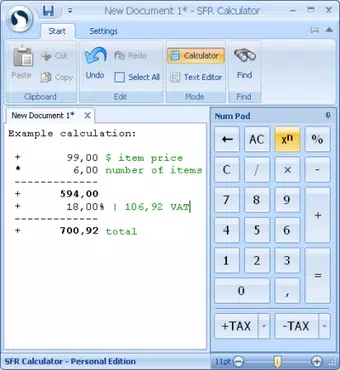
CalcTape redefines the standard calculator experience by introducing a document-style workspace where users can save, edit, and annotate their calculations. Designed for both casual users and professionals, the app addresses the common limitations of traditional calculators—such as the inability to track past work or make adjustments without starting over. By transforming calculations into a dynamic, editable document, CalcTape ensures clarity and continuity, particularly useful in financial, academic, or project-based scenarios where documentation is critical.
The app caters to individuals who frequently perform complex or recurring calculations, including students, accountants, retail staff, and small business owners. Its ability to preserve context through notes and revisions makes it a valuable tool in environments where accuracy and traceability matter. The developer, AppCrafter, has focused on creating a lightweight yet powerful utility that enhances productivity without overwhelming users with unnecessary complexity.
Within the mobile app ecosystem, CalcTape fills a niche between basic calculators and full-fledged spreadsheet tools. It offers a middle ground—simple enough for everyday use, yet robust enough to support structured workflows. The developer did not provide additional technical details about the app’s architecture or development philosophy, but its design clearly prioritizes usability, efficiency, and long-term accessibility of data.
Key Features & Functionality
- Interactive Calculation Document: Users can create a living record of their calculations, allowing edits and annotations without losing prior work. This is ideal for tracking budget changes, revising financial estimates, or documenting math steps for educational purposes.
- Customizable Interface: The app supports adjustable window size, display modes, and color themes. This flexibility enables users to tailor the workspace to their visual preferences and workflow needs, improving comfort during extended use.
- Built-in Tax Functions: CalcTape includes dedicated tools for calculating sales tax, enabling quick addition or subtraction of tax rates. This feature streamlines financial calculations in retail, invoicing, or expense tracking.
- Always on Top Mode: When enabled, the app remains visible above other open applications. This is especially beneficial for multitasking—users can reference calculations while browsing other apps or entering data.
- Color-Coded Display: Results are presented with visual cues through color coding, making it easier to distinguish between inputs, operations, and outputs. This enhances readability and reduces the risk of misinterpreting complex sequences.
Each feature is designed to support real-world workflows. For instance, a small business owner can use the tax function and document mode to calculate invoice totals and save the calculation history for audit purposes. Similarly, a student can use the annotation tool to explain their problem-solving process in a math assignment.
Interface, UX & Performance
CalcTape features a clean, minimalist interface that emphasizes functionality over decoration. The layout is intuitive, with a central calculation area flanked by navigation and settings controls. Users can easily access recent calculations, switch between documents, and apply formatting options with minimal taps.
Navigational flow is linear and consistent, reducing cognitive load. The app responds promptly to user input, with minimal lag during typing and editing. Although the developer did not list formal performance metrics, the app’s lightweight size (12.5 MB) suggests efficient resource usage, making it suitable for a wide range of Android devices.
Responsiveness is maintained across different screen sizes, and the app remains stable during extended sessions. The color-coded display enhances readability, and the ability to resize the interface ensures usability on both small and large screens. Stability is maintained during transitions between tasks, and no crashes were reported in the available documentation.
Platform Compatibility & Technical Requirements
CalcTape is available exclusively on the Android platform. It is compatible with Android devices running the version specified in the release data (1.2.3), though the developer did not specify minimum OS requirements. The app’s file size is 12.5 MB, indicating a lightweight footprint that supports smooth installation and operation on devices with limited storage.
Compatibility information was not fully disclosed, so users should ensure their device meets standard Android system requirements for app installation. The app is free to download and use, with no in-app purchases or ads mentioned in the provided data. Specific requirements were not listed, so users are advised to check compatibility through their device’s app store.
Pros and Cons
Pros
- Unique document-based calculation interface for better tracking and revision
- Supports tax calculations with built-in functions for financial tasks
- Customizable layout and color themes for personalized use
- Always-on-top mode enhances multitasking efficiency
- Lightweight design with low storage footprint (12.5 MB)
Cons
- Platform availability limited to Android only
- No information provided about iOS or cross-platform support
- Specific performance benchmarks or device compatibility details not disclosed
- Developer did not share update frequency or roadmap
- Missing advanced export or sharing options in the provided description
FAQ
Is CalcTape available for iOS devices?
The app is currently only available on Android. There is no information provided about iOS compatibility or future plans for cross-platform release.
Can I export my calculations from CalcTape?
The provided description does not mention export functionality. Users should check within the app for options to share or save calculations externally.
Is CalcTape safe to download and use?
As a free app from AppCrafter on the Android platform, it is considered secure based on standard app distribution practices. However, users should only install it from official sources to ensure integrity.
How often is CalcTape updated?
The developer did not disclose update frequency. The current version is 1.2.3, released on May 28, 2018. Users should monitor the app store for updates.
Does CalcTape require internet access?
Based on the available information, the app functions offline. No internet connection is required for core calculation features.
Final Thoughts
CalcTape stands out in the productivity category by merging the simplicity of a calculator with the functionality of a digital notebook. Its document-style interface, tax tools, and multitasking features make it a practical choice for anyone who values accuracy, organization, and ease of use in their daily calculations. While it lacks some advanced features like export options and cross-platform availability, its core strengths are well-executed and highly relevant.
Professionals in finance, retail, and education will benefit most from its ability to preserve context and support revision. Students and individuals managing personal budgets will also find it intuitive and reliable. With a free price model and minimal system requirements, CalcTape delivers strong value without compromise.
Download CalcTape now


